
▪️ SNIPPETS BY LIA GARVIN
Every week.
WATCH THE 2-MIN TOUR
A SCENE YOU MIGHT RECOGNIZE…
You’re texting Maya, your ops lead, to ask if she ever heard back from the vendor. Then you’re scrolling ClickUp to figure out where the launch deck landed. Then you’re rewriting the proposal Steve sent over last week (this was supposed to be the quarter you stopped doing this).
Your husband already gave up and went to bed. The kitchen is dark. Standing there with the last of the gluten-free pretzels in one hand (great, now you have to update the grocery list too), the voice in your head says what it’s been saying for six months: maybe I just can’t hire people who actually get it.
The issue isn’t you, and it’s not Maya. It’s that nobody ever gave you a bird’s eye view, in a way that showed you what your team is working on right now. So you default to chasing people one by one. Your team defaults to guessing what you want. And the loop runs again.
You can’t see who’s overloaded, and who has capacity to spare.
The person at a 9 out of 10 plate is one bad week from quietly updating her LinkedIn. The person at a 4 is feeling underused and starting to wonder if she’s even needed. Burnout and disengagement are the two ways your best people leave, and right now you can’t see either one coming.
Your team isn’t always going to tell you they’re stuck.
What could have been a 15-minute unblock on Tuesday becomes a fire drill Friday afternoon. Then it’s the weekend. Then a contract slips. Then a client gets quiet. Most blockers don’t get raised, they just slow things down until something breaks.
You find out the wrong things got done too late.
Two people working on the same project. Nobody working on the important one. You find out on a client call, or when something ships you didn’t approve, or when a deadline lands and nothing’s there. The cost of “I thought you had it” is paying for the same work twice.
Your best people are wondering if you even notice.
Your best team member did something brilliant in Week 3 of the quarter. By Week 8, nobody remembers. People don’t quit jobs for money, they quit feeling invisible. Replacing them costs you 50 to 200% of their salary, and there is no cheaper retention play than letting people feel seen.
SO WE’RE CLEAR
There are 18 work-tracking tools out there. Your team has tried six of them.
Here’s how this one is different.
❌ Another project management tool you’ll abandon in six weeks
❌ A status meeting that eats an hour every week
❌ One more thing your team dreads filling out
❌ A complicated setup that takes a whole weekend to configure
❌ Priced per seat, so every hire makes it more expensive
✅ Zero overhead for you, under 5 mins a week for your team.
✅ Email digest delivered to your inbox
✅ Framing around wins so you team wants to fill it out
✅ Takes <30 seconds to setup
✅ Free – because that’s how much I believe in this
HOW IT WORKS
One simple loop your team will actually keep up.
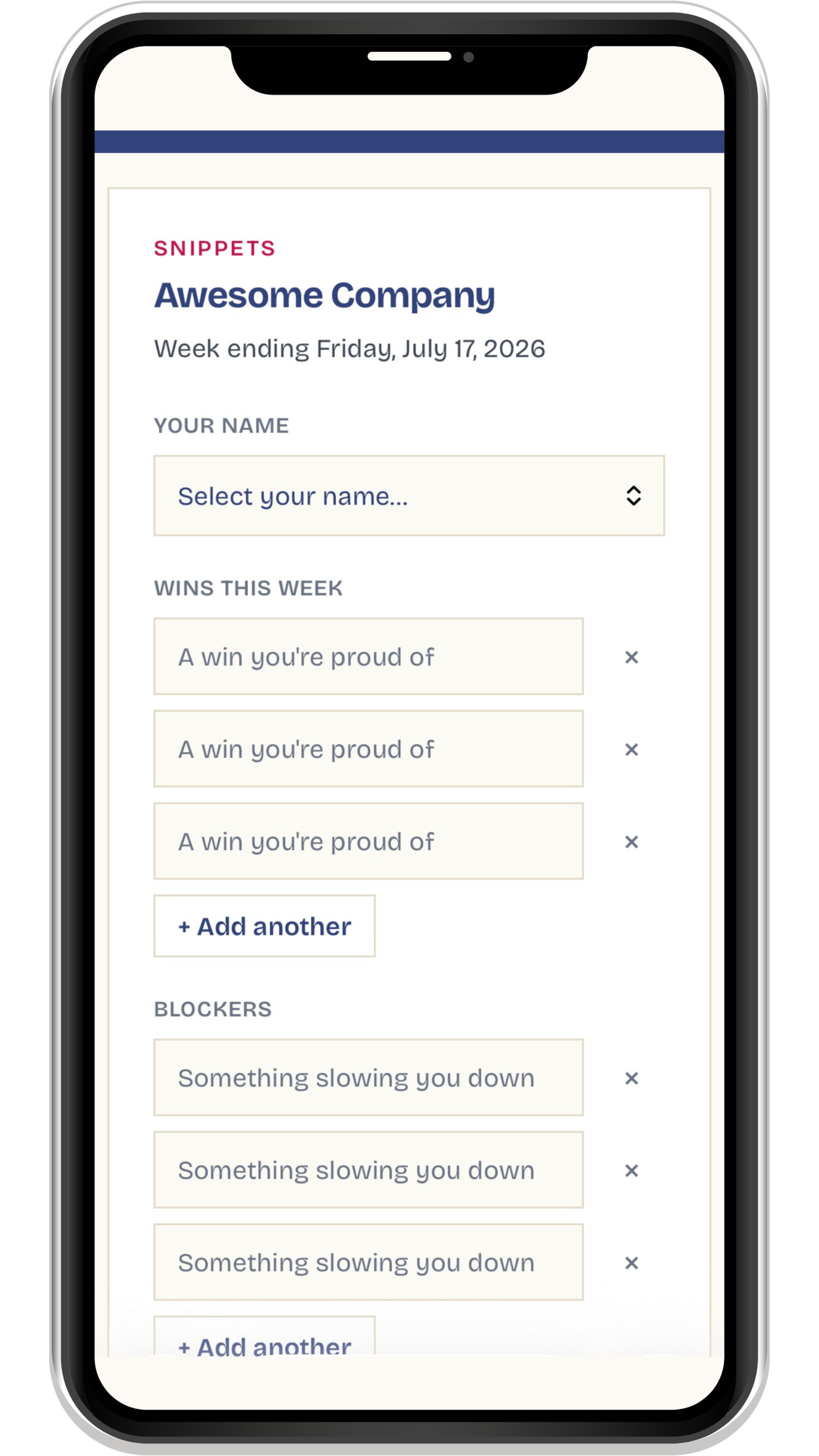
Five minutes for them on Friday. The summary delivered to your inbox on Monday. Done.
Three short fields and a bandwidth gauge. No 40-field forms or moving of tasks. Just enough structure to be useful, nothing more.
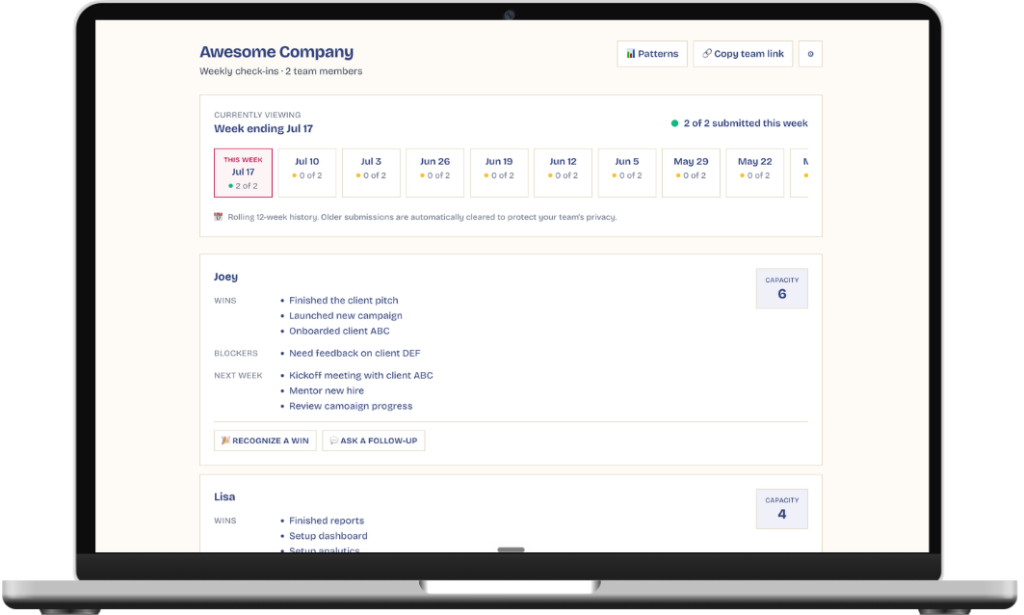
Open Snippets with your morning latte. See exactly who finished what, who has room, and who’s running hot. Before they ask for help, before they burn out, before you have to chase.
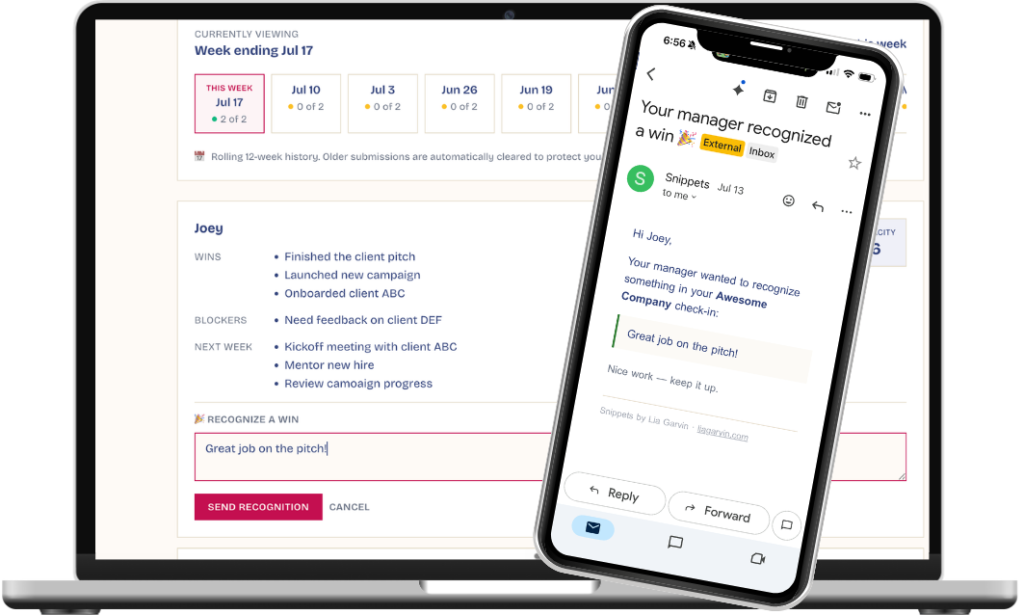
Leave anyone a quick note to recognize a win or ask a follow-up — they get it by email, no login needed. And watch the patterns build: recurring blockers, capacity trends, and who’s consistently showing up across a rolling 12 weeks. It’s your 1:1 prep, already done.
THE PART YOU DIDN’T KNOW YOU NEEDED
You don’t have time to manually track who’s been overloaded for three weeks straight, or which blocker keeps coming back. Snippets does it for you.
Automatically flags anyone whose plate has been at 9 or 10 for multiple weeks (burnout incoming) or stuck at 4 or below (under-utilized, or quietly disengaged). You see it before they say it.
If the same blocker keeps appearing on someone’s submission week after week, Snippets surfaces it. No more “wait, didn’t you mention this last month?” missed catches.
See which topics and projects are trending across your whole team. Spot the strategic patterns. Decide what to double down on, and what to kill.
WHAT OWNERS ARE SAYING
Love from business owners who finally got their Sunday nights back
“My team was always getting frustrated with me bugging them for updates, so I stopped asking them. But then I felt like I had no idea what people were working on. Not anymore. My team loves to fill out Snippets because they feel a sense of accomplishment each week, AND I have a system for knowing people are working on the right things. Game changer.”
“I’m really resistant to process and slowing things down. But each time I hire someone, I worry we’ll lose that sense of closeness we had as a small team. Snippets saved us. Since implementing it, we have an easy way to keep everyone on the same page without adding layers of process. Thank you!”
“I’ve been burned by setting up complicated work-tracking systems only to see none of my team using them. Snippets is not that. It’s a lightweight template your team wants to fill out so they can share their wins and priorities. It’s literally the tool I’ve been looking for for years, and my team loves it.”
YOUR QUESTIONS
This is the question. Honest answer: because the form takes five minutes, and your team gets a place to share their wins (which they otherwise never get credit for), it's all upside for them to fill it out. The bandwidth gauge gives them a way to say "I'm overloaded" without having to find the right moment to bring it up. Frame it in terms of how it helps them and they will be onboard.
Project management tools track tasks. Snippets is the layer that gives you a birds eye view into what you need to see as a business owner. It sits on top of whatever you already use. The dashboard shows you who's stuck and how full each plate is, not which JIRA ticket is in QA. Most clients keep their existing tracker and add Snippets as the "what's actually happening with my people" view their tool doesn't give them.
There's nothing to install. Snippets runs in any browser, on desktop and mobile. Setup is two steps: sign up, bulk-invite your team by email (up to 10 at a time, with a personal note if you want). The app sends reminders do you don't have to nudge anyone, and a weekly digest lands in your inbox every Monday. There's an onboarding walkthrough in the app and a 90-second video sent right to your email.
Yes - the app is free. If you are looking data storage longer than 12 weeks, PDF exports, and trends analysis, email [email protected] for access to Snippets+
No tracking pixels. No analytics on user behavior. No AI training on your team's submissions or feedback notes. Only 12-weeks of reports are saved at a time, and you can request a full data deletion at any time.
No. Team members only see their own snippets and the feedback their leader left for them. Owners/managers (whoever sets up the team) see all submissions. The bandwidth view is for your eyes only.
All three work the same. Snippets is designed for any team that needs a weekly rhythm. It works especially well for remote teams (where you have less ambient information about who's doing what), but on-site teams love it too, because the bandwidth gauge gives a structured way to surface "I'm slammed" or "I have capacity" without it becoming a meeting topic.
READY?
Five minutes for your team. Total clarity for you.
Fill out the form below, to use Snippets with your team!